> ## Documentation Index
> Fetch the complete documentation index at: https://docs.subtotal.com/llms.txt
> Use this file to discover all available pages before exploring further.
# Introduction
> Connect Smile and configure how customers are rewarded.
## Overview
Our integration with [Smile](https://smile.io) makes it easy to reward customers for linking accounts and making retail purchases.
Subtotal awards points directly in Smile by posting points transactions against each customer's Smile profile. No matching earning rule needs to exist on the Smile side — Subtotal calculates the points, then records the transaction with a description you choose.
## Get your Smile API key
Sign in to your Smile admin and navigate to *Settings → Developer Tools → Manage API keys*. Generate a new REST API key for Subtotal and copy the secret value — you'll need it to connect the integration.
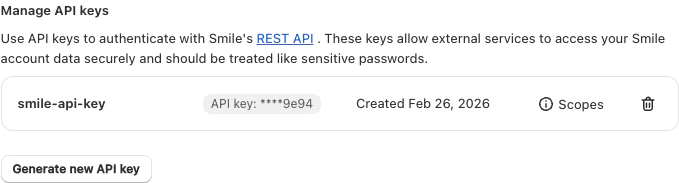 Smile shows the full secret only once, at creation time. After that only the last four characters are visible. Store the key somewhere safe, or generate a new one if you lose it.
## Connect your Smile account
Sign in to the Subtotal Dashboard and connect your Smile account to enable the integration.
Navigate to [*Integrations → Smile → Connect*](https://dashboard.subtotal.com/integrations/smile).
Click the `Connect Smile` button.
Smile shows the full secret only once, at creation time. After that only the last four characters are visible. Store the key somewhere safe, or generate a new one if you lose it.
## Connect your Smile account
Sign in to the Subtotal Dashboard and connect your Smile account to enable the integration.
Navigate to [*Integrations → Smile → Connect*](https://dashboard.subtotal.com/integrations/smile).
Click the `Connect Smile` button.
 Paste your Smile REST API key, then click `Save Integration`.
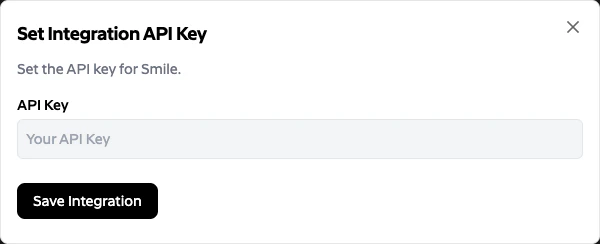 You should now see an `Active` status on the Smile integration page.
 ## How Subtotal awards points in Smile
For each qualifying event, Subtotal:
1. Looks up the Smile customer by **email** (`GET /v1/customers?email=…`).
2. POSTs a points transaction (`POST /v1/points_transactions`) with the computed point value and the **Action name** you set as the transaction description.
The description shows up in the customer's Smile activity feed, so choose something customer-friendly (e.g. `Retail purchase`, `Linked a retail account`). Subtotal does not reference any Smile-side earning rule or custom activity token — the only required setup in Smile is the API key.
## Configure actions
After connecting, configure the actions Subtotal should send to Smile. Each action maps a Subtotal event (an account being linked, a purchase being made) to a points award.
## How Subtotal awards points in Smile
For each qualifying event, Subtotal:
1. Looks up the Smile customer by **email** (`GET /v1/customers?email=…`).
2. POSTs a points transaction (`POST /v1/points_transactions`) with the computed point value and the **Action name** you set as the transaction description.
The description shows up in the customer's Smile activity feed, so choose something customer-friendly (e.g. `Retail purchase`, `Linked a retail account`). Subtotal does not reference any Smile-side earning rule or custom activity token — the only required setup in Smile is the API key.
## Configure actions
After connecting, configure the actions Subtotal should send to Smile. Each action maps a Subtotal event (an account being linked, a purchase being made) to a points award.
 | Setting | Description |
| ----------------------- | -------------------------------------------------------------------------------------------------------------------------------------------------------------- |
| **Customer identifier** | The field on the connection used to identify the customer in Smile. The Subtotal Smile integration currently only supports identifying customers by **Email**. |
| **Actions** | One or more event-to-reward mappings. Each action specifies the event type, retailers it applies to, and the points to award. |
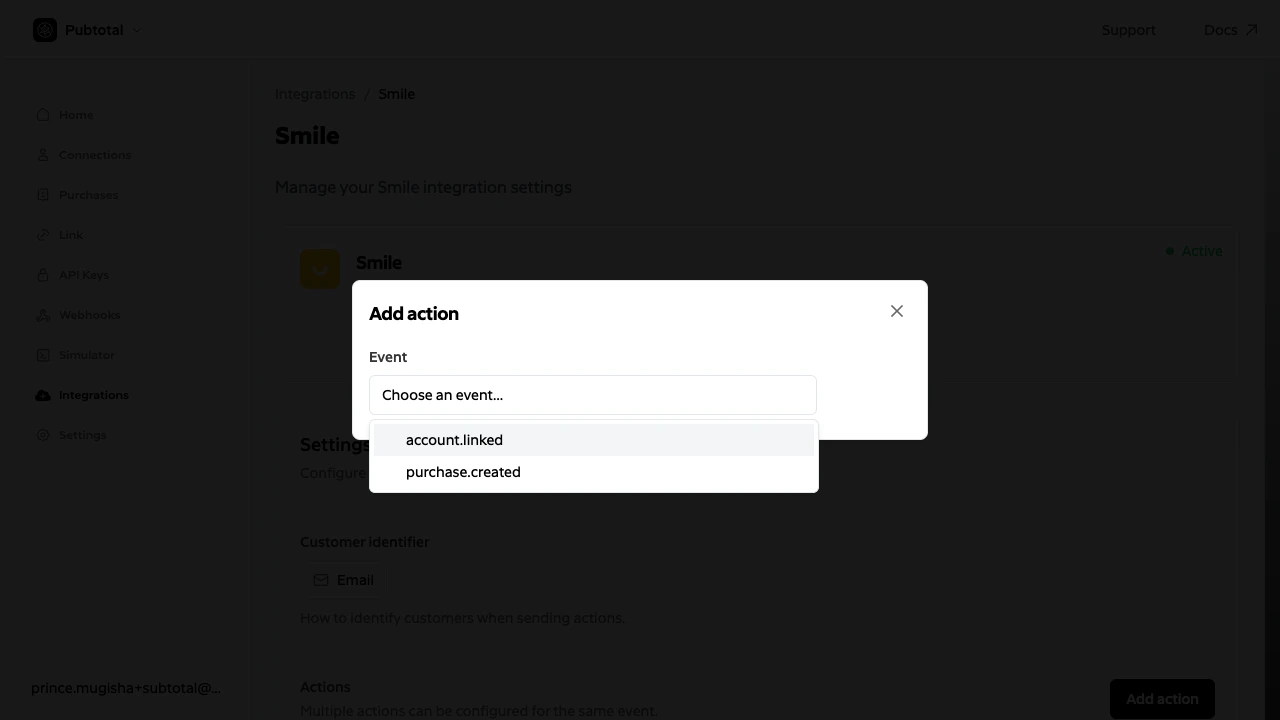
To add an action, click `Add action` and choose an event:
| Field | Description |
| ------------------------------------------ | ----------------------------------------------------------------------------------------------------------------------------------------------------------------------------------------------------------------------------------------------------------------------------------------------------------------------------------- |
| **Event** | `account.linked` (fired when a customer links a retailer account) or `purchase.created` (fired for each purchase Subtotal collects). |
| **Action name** | A human-readable label. Sent to Smile as the points transaction description — this is what the customer will see in their Smile activity feed. |
| **Retailers** | Restrict the action to specific retailers, or apply it to all. |
| **Points** *(account.linked)* | Flat number of points awarded when a customer links a qualifying account. |
| **Points per dollar** *(purchase.created)* | Points awarded per dollar of spend on items Subtotal collects from the purchase. Subtotal computes points as `ceil(items_subtotal × points_per_dollar)` — where `items_subtotal` is the sum of `price × quantity` for each collected item — and sends the resulting integer to Smile. Taxes, shipping, and other fees are excluded. |
| **Start date** *(purchase.created)* | Only purchases made on or after this date are rewarded. This controls how much historical purchase data gets sent to Smile when a customer first links their account. |
See [Rewarding linked accounts](/docs/integrations/smile/linked-account) and [Rewarding purchases](/docs/integrations/smile/purchases) for examples of each action type.
## Customer identification
The Smile integration identifies customers by their **email address**. Subtotal calls Smile's `GET /v1/customers?email=…` endpoint to resolve the Smile customer for each connection, then awards points against that customer's profile.
How the email is captured depends on your setup:
* **Shopify app** — the customer's email is captured automatically from their Shopify profile. No additional parameters needed.
* **API integration** — include the `email` field when creating a connection via [`POST /connections`](/docs/api-reference/connections/create). Without it, Subtotal won't be able to identify the customer in Smile.
If no Smile customer exists for a connection's email (e.g. the customer hasn't been created in Smile yet), the action is skipped and logged. The customer must exist in Smile at the time the event is processed — points cannot be awarded retroactively.
| Setting | Description |
| ----------------------- | -------------------------------------------------------------------------------------------------------------------------------------------------------------- |
| **Customer identifier** | The field on the connection used to identify the customer in Smile. The Subtotal Smile integration currently only supports identifying customers by **Email**. |
| **Actions** | One or more event-to-reward mappings. Each action specifies the event type, retailers it applies to, and the points to award. |
To add an action, click `Add action` and choose an event:
| Field | Description |
| ------------------------------------------ | ----------------------------------------------------------------------------------------------------------------------------------------------------------------------------------------------------------------------------------------------------------------------------------------------------------------------------------- |
| **Event** | `account.linked` (fired when a customer links a retailer account) or `purchase.created` (fired for each purchase Subtotal collects). |
| **Action name** | A human-readable label. Sent to Smile as the points transaction description — this is what the customer will see in their Smile activity feed. |
| **Retailers** | Restrict the action to specific retailers, or apply it to all. |
| **Points** *(account.linked)* | Flat number of points awarded when a customer links a qualifying account. |
| **Points per dollar** *(purchase.created)* | Points awarded per dollar of spend on items Subtotal collects from the purchase. Subtotal computes points as `ceil(items_subtotal × points_per_dollar)` — where `items_subtotal` is the sum of `price × quantity` for each collected item — and sends the resulting integer to Smile. Taxes, shipping, and other fees are excluded. |
| **Start date** *(purchase.created)* | Only purchases made on or after this date are rewarded. This controls how much historical purchase data gets sent to Smile when a customer first links their account. |
See [Rewarding linked accounts](/docs/integrations/smile/linked-account) and [Rewarding purchases](/docs/integrations/smile/purchases) for examples of each action type.
## Customer identification
The Smile integration identifies customers by their **email address**. Subtotal calls Smile's `GET /v1/customers?email=…` endpoint to resolve the Smile customer for each connection, then awards points against that customer's profile.
How the email is captured depends on your setup:
* **Shopify app** — the customer's email is captured automatically from their Shopify profile. No additional parameters needed.
* **API integration** — include the `email` field when creating a connection via [`POST /connections`](/docs/api-reference/connections/create). Without it, Subtotal won't be able to identify the customer in Smile.
If no Smile customer exists for a connection's email (e.g. the customer hasn't been created in Smile yet), the action is skipped and logged. The customer must exist in Smile at the time the event is processed — points cannot be awarded retroactively.